A Professional's Take on the New Synology Diskstation DS925+
For more than a decade, Synology has occupied a unique position in the world of Network Attached Storage (NAS). They are often described as the Apple of the storage world—a reputation built on the strength of DiskStation Manager (DSM), an operating system so intuitive that it bridges the gap between consumer ease-of-use and enterprise-grade reliability. The release of the DS925+ represents a pivotal moment for the brand as it seeks to address the evolving needs of creative professionals, remote-work teams, and power users who have found themselves outgrowing the hardware limitations of previous generations. In this professional analysis, the DS925+ is examined not just as a box of drives, but as a central nervous system for data management in a high-bandwidth world.
The DS925+ arrives at a time when data footprints are expanding at an exponential rate. Standard 1080p video workflows have transitioned into 4K and 8K 10-bit color spaces, while digital photography has moved from 20-megapixel sensors to 60 and 100-megapixel monsters. For the professional user, storage is no longer just about capacity; it is about throughput, IOPS (Input/Output Operations Per Second), and the ability to run containerized applications without the system stuttering under the load. Synology has traditionally been conservative with hardware upgrades, prioritizing system stability over "bleeding edge" specifications. However, the DS925+ shows a noticeable shift toward addressing the demands of the modern power user.
The Evolution of Hardware Architecture
Under the hood, the DS925+ features a significant leap in processing power. Moving to newer-generation silicon has allowed Synology to improve the efficiency of background tasks such as Btrfs file system scrubbing, file indexing, and real-time encryption. For the professional, this translates into a system that remains responsive even when multiple users are hitting the server simultaneously. The integration of high-speed NVMe slots, formerly reserved primarily for caching, has evolved into a system that supports NVMe storage pools. This is a game-changer for professionals who need an ultra-fast tier of storage for active projects or database hosting while using the four main 3.5-inch bays for high-capacity archival storage.
Connectivity has also seen a necessary overhaul. While 1GbE ports were the industry standard for twenty years, the modern professional network environment is rapidly shifting toward 2.5GbE and 10GbE infrastructures. The DS925+ bridges this gap by offering out-of-the-box support for higher networking speeds, reducing the bottleneck between the workstation and the DiskStation. This improvement is particularly vital for those working in media production or engineering, where transferring several hundred gigabytes of data is a daily occurrence. The inclusion of a PCIe expansion slot provides additional future-proofing, allowing users to adapt their hardware as their network infrastructure matures.
Software Ecosystem: The Power of DSM 7
Hardware is only half of the story. The DS925+ runs the latest version of DiskStation Manager (DSM), which remains the strongest selling point for the Synology ecosystem. For the professional, DSM acts as a comprehensive private cloud suite. Synology Drive provides a robust alternative to public cloud services like Google Drive or Dropbox, offering cross-platform file syncing without the recurring monthly fees or privacy concerns of third-party hosting. In a professional context, being able to host your own "Dropbox-equivalent" on-premises means total control over your data sovereignty.
Furthermore, the Synology Photos application has matured into a genuine professional tool. It offers advanced metadata management, facial recognition, and rapid browsing that rivals professional asset management software. For photographers, this means having an instantly accessible portfolio and client delivery system that runs directly from their home or office server. The DSM ecosystem also includes Active Backup for Business, a license-free backup solution that can image entire PCs, Macs, and virtual machines. For a small business, this single feature can save thousands of dollars in software licensing fees annually, making the DS925+ a highly cost-effective investment.
Real-World Use Cases for the DS925+
To understand the value of the DS925+, one must look at how it solves specific professional friction points. Consider a boutique video production agency. Traditionally, editors would work off local "shuttle" drives, which are prone to failure and difficult to collaborate on. With the DS925+, the team can configure a 10GbE network and edit directly off the NAS. The NVMe storage tier acts as the "scratch disk" for current projects, while the larger spinning disks handle the massive amounts of raw footage. This centralizes the workflow and ensures that all data is protected by Synology’s SHR (Synology Hybrid RAID) technology.
Another common use case is the specialized task of virtualization and containerization. Many IT professionals use Synology hardware to run Docker containers or lightweight Virtual Machines. The DS925+, with its expanded RAM capacity and improved CPU, handles these tasks with significantly more headroom than its predecessors. This allows a professional to host their own web development environments, home automation servers, or surveillance management systems (via Synology Surveillance Station) on a single, compact device that consumes a fraction of the power of a dedicated rack-mount server.
Performance Metrics and Comparison
When evaluating the DS925+, it is helpful to see how it sits within the current market landscape. The NAS market is divided between those who want the cheapest possible storage and those who need a reliable "all-in-one" server. Synology consistently targets the latter, focusing on the software experience and hardware integration.
Discover deals on Electronics — updated daily.
Browse Now →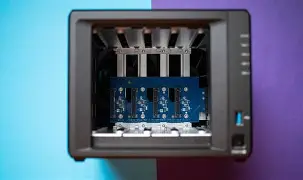
| Feature | DS925+ Specification | Professional Impact |
|---|---|---|
| Processor | Intel Celeron/Ryzen Quad-Core | Faster file indexing and better VM performance. |
| Default Memory | 8GB DDR4 (Expandable) | Handles more concurrent users and Docker containers. |
| Networking | Dual 2.5GbE (10GbE Optional) | Reduces time spent waiting for file transfers. |
| Storage Bays | 4 Main Bays + 2 NVMe Slots | Tiered storage for speed and massive archival capacity. |
| Operating System | DSM 7.x | Self-contained private cloud and backup ecosystem. |
The Buying Guide: Is the DS925+ Right for You?
Deciding to invest in a NAS is a significant decision for any professional. The DS925+ is positioned as a mid-to-high-tier device. If you are a casual user who only needs to backup a few family photos once a month, this device is likely overkill; a two-bay J-series model would suffice. However, if you fall into one of the following categories, the DS925+ is designed specifically for your workflow:
The Creative Professional: If you work with large file formats like ProRes, RAW, or high-fidelity audio, the DS925+ offers the speed and redundancy you need. The ability to expand to nine drives via the DX517 expansion unit means this server can grow with your career, eventually housing over 100 terabytes of data.
The Small Business Owner: For an office with 5 to 20 employees, the DS925+ acts as an excellent file server. It can manage user permissions via Active Directory or LDAP, host an internal mail server, and provide a collaborative office suite via Synology Office, which allows multiple users to edit documents and spreadsheets simultaneously in a web browser.
The Privacy Advocate: In an era of data breaches and subscription fatigue, owning your own server is the ultimate act of digital independence. The DS925+ allows you to host your own passwords, contacts, calendars, and media streaming services (like Plex) without ever sending your data to a third-party corporation.
Configuration Best Practices
To get the most out of the DS925+, professionals should follow a few key configuration steps. First, always utilize the Btrfs file system. This allows for "self-healing" of data, where the NAS can detect and repair silent data corruption—a phenomenon known as "bit rot." Second, consider the "3-2-1" backup rule: three copies of your data, on two different media, with one copy offsite. The DS925+ makes this easy with Hyper Backup, which can automatically encrypt and send your data to another NAS or a cloud storage provider like Synology C2.
Memory expansion is another critical consideration. While 8GB is sufficient for basic file serving, professionals looking to run several Docker containers or a Windows Virtual Machine should look at upgrading to 16GB or 32GB of RAM. This relatively inexpensive upgrade significantly extends the lifespan of the device by providing more headroom for future software updates and more complex application deployments.
Pros and Cons: A Balanced View
No piece of technology is perfect, and the DS925+ is no exception. While it is a market leader in many respects, there are tradeoffs that buyers should be aware of before making their purchase.
- Pro: Industry-Leading Software. DSM remains the most polished and feature-rich NAS operating system available. The mobile apps for iOS and Android are refined and allow for seamless access to files on the go.
- Pro: Versatile Expansion. The ability to add an expansion unit and a 10GbE NIC means the unit adapts to your needs rather than forcing you to buy a new server every few years.
- Pro: Quiet and Efficient. Even in a small home office, the DS925+ remains remarkably quiet. Its power consumption is tuned for 24/7 operation without significantly impacting your electricity bill.
- Pro: Security Focus. Synology provides frequent security patches and includes tools like Security Advisor and 2-Factor Authentication (2FA) to keep your intellectual property safe.
- Con: Hardware "Conservative" Approach. Some competitors offer higher-spec processors or built-in 10GbE at a lower price point, though they lack Synology’s software polish.
- Con: Proprietary Accessories. Synology has increasingly encouraged the use of their own branded hard drives and RAM, which can be more expensive than third-party equivalents, though they offer better compatibility support.
- Con: 10GbE is an Upgrade. In a professional-grade device, many would have liked to see 10GbE included as a native port rather than requiring an optional expansion card.
Professional Reliability and Warranty
One of the aspects professionals appreciate most about the plus-series is the build quality and support. The DS925+ is built for longevity. The internal cooling system is designed with redundancy in mind, and the chassis allows for easy disk swapping without tools. Furthermore, Synology's technical support is widely regarded as some of the best in the industry. For a business, knowing that you can get a replacement unit quickly or talk to a knowledgeable technician is often more important than the raw gigahertz of the processor.
Reliability also extends to the RAID configurations. Most users will opt for SHR (Synology Hybrid RAID), which allows for the mixing of different drive sizes. This is a massive professional advantage because it allows for an incremental upgrade path. If you start with four 8TB drives and later need more space, you can replace two of them with 16TB drives and the system will automatically expand your usable space without requiring you to wipe and rebuild the entire volume. This flexibility is something that traditional RAID 5 or RAID 6 configurations simply cannot offer.
Shop the latest Electronics picks on Amazon.
Shop Amazon →The Security Architecture of the DS925+
In today's threat landscape, ransomware is a constant concern for any professional. The DS925+ addresses this through Snapshot Replication. This technology creates "read-only" copies of your data at specific points in time. Because these snapshots are separate from the main file system, they are largely immune to encryption by ransomware. If an attack occurs, a professional can simply "roll back" their entire file structure to the state it was in five minutes before the infection occurred. This capability provides a level of peace of mind that standard external hard drives cannot match.
Additionally, the hardware encryption engine ensures that even if the physical hard drives are stolen, the data remains unreadable without the encryption key. For those dealing with sensitive client data, HIPAA-compliant records, or financial documents, this level of security is not just a luxury—it is a legal and ethical requirement. The system also supports auto-blocking of suspicious IP addresses and has a built-in firewall that is easily configurable by users with minimal networking experience.
Impact on Workflow Efficiency
For many, the transition to a NAS like the DS925+ represents a move from "reactive" data management to "proactive" data strategy. Instead of hunting through mismatched external drives for a file from three years ago, everything is indexed, searchable, and accessible from anywhere in the world. The time saved in file retrieval and organization directly impacts the bottom line of a freelance professional or small agency. The "Universal Search" tool within DSM is particularly impressive, allowing for full-text indexing of documents, which means you can find a PDF based on a single keyword inside the document rather than just the filename.
Collaboration is also greatly enhanced. The Synology Office suite allows for real-time collaborative editing. While many use Google Docs for this, having these files hosted on your own DS925+ ensures that sensitive business strategies or financial projections never leave your local environment. It brings the collaborative power of the big tech giants into the hands of the individual professional or small team.
Final Professional Assessment
The Synology DiskStation DS925+ is a refined evolutionary step for a product line that has long been the gold standard for small-scale professional storage. It does not reinvent the wheel, but it strengthens the spokes. By addressing the need for faster networking, supporting NVMe storage pools, and maintaining the excellence of the DSM operating system, Synology has created a device that is easy to recommend.
While power users may occasionally grumble about the hardware specifications compared to DIY "white box" servers, the value of Synology lies in the integration. A professional’s time is valuable. Saving five hours of configuration and troubleshooting time by using a polished system like the DS925+ is worth more than the slight premium paid for the hardware. It is a stable, secure, and expandable platform that allows professionals to stop worrying about their storage and start focusing on their work.
Ultimately, the DS925+ serves as a robust infrastructure piece for the modern era. Whether it is acting as a backup target, a video editing hub, a virtualization host, or a private cloud, it performs its duties with a level of quiet competence that is the hallmark of a professional tool. As data continues to be the most valuable asset of the modern era, the importance of a reliable place to store, manage, and protect that asset cannot be overstated. The DS925+ is, without question, one of the best tools for that job.