Blind Test: Msi Cubi Nuc 1M vs Msi Titan 18 Hx 2025 - Which is Actually Better?
At first glance, comparing the MSI Cubi NUC 1M to the MSI Titan 18 HX (2025) looks almost unfair. One is a tiny, VESA-mountable “business & office” mini PC designed to disappear behind a monitor; the other is a no-compromises 18-inch desktop-replacement gaming laptop built to flex the fastest mobile parts money can buy. Yet shoppers regularly end up cross-shopping devices like these because the real question is rarely “which is faster?”—it’s which is actually better for the way a person works, plays, and maintains their setup.
This “blind test” framing is useful because it forces a buyer to ignore category labels and focus on outcomes: noise, heat, desk space, battery dependence, upgrade paths, connectivity, reliability, and what the machine enables day-to-day. The result is a surprisingly clear verdict: the MSI Titan 18 HX (2025) is “better” only when the work truly demands top-tier mobile CPU/GPU power. For many people who live in browsers, documents, meetings, and light creative work—especially at a desk with external monitors—the Cubi NUC 1M can be the more practical, lower-friction “better” computer.
Quick reality check: these aren’t both laptops
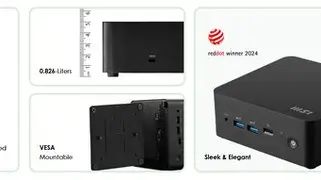
The Cubi NUC 1M is a compact desktop mini PC (about a 0.826-liter chassis) that’s meant to be mounted, left plugged in, and used with external peripherals. MSI positions it for business productivity and signage-style deployments, emphasizing security, reliability, and a dense I/O layout including dual 2.5G LAN and Thunderbolt 4. It can even accept USB-C power input on one Thunderbolt port (PD-in up to 100W) and supports multiple displays.
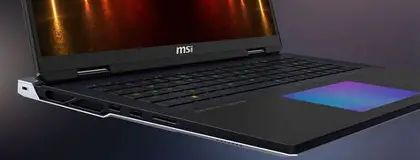
The Titan 18 HX (2025) is a large-format laptop intended to replace a desktop tower while remaining technically portable. MSI’s 2025 “AI” Titan 18 HX configurations are built around Intel Core Ultra 200HX-series CPUs and up to an NVIDIA GeForce RTX 5090 Laptop GPU (24GB GDDR7), with a high-end 18-inch Mini LED panel and a thick cooling solution that can feed very high combined power budgets. It is also extremely large and heavy (around 3.6 kg), with a big power adapter, and it’s the kind of device owners plan their backpacks—and outlets—around.
What “actually better” means in real life
Buyers typically care about:
- Responsiveness in the apps they use most (not synthetic benchmarks)
- Noise and heat, especially in shared spaces or long sessions
- Desk footprint and cable sanity (dockability, monitor support, ports)
- Upgradability and serviceability (RAM/SSD access, long-term value)
- Mobility (true travel use vs “I can move it sometimes”)
- Security and manageability for work or sensitive data
- Total cost of ownership (power draw, accessories, repairs, longevity)
With those priorities in mind, here’s how both devices perform when judged by outcomes instead of hype.
Product analysis: MSI Cubi NUC 1M
Design intent and daily experience
The Cubi NUC 1M is built to be the computer you don’t think about. Its appeal is the combination of a very small footprint with unusually rich connectivity for its size. In a home office, it’s the kind of PC that can mount behind a monitor, run quietly, and keep a desk visually clean. In small business environments, it can act as a standardized “endpoint” machine that’s easier to deploy than full towers.
MSI leans into practicality: a built-in MicroSD card reader for quick transfers, an external power switch concept for certain installations, and a focus on sustainability materials and certifications on some variants.
Performance expectations (and the honest ceiling)
Configured up to an Intel Core 7 150U (a modern efficiency-focused laptop-class CPU), the Cubi NUC 1M is best understood as a fast productivity computer rather than a creative workstation or gaming rig. It can feel excellent in typical office usage: dozens of browser tabs, Slack/Teams/Zoom, spreadsheets, lightweight photo work, and multi-monitor multitasking. It can also do light development and scripting tasks comfortably.
Where it will not compete with the Titan is sustained heavy compute (long renders, heavy simulation, serious GPU workloads) and high-end gaming. Buyers who assume “new CPU equals gaming-ready” often end up disappointed—not because the Cubi is slow, but because it’s not designed around a dedicated high-wattage GPU or the thermal headroom needed for that kind of performance.
Connectivity: where the Cubi punches above its weight
This is one of the Cubi NUC 1M’s strongest advantages. MSI equips it with a surprisingly “desktop-like” set of ports, including two Thunderbolt 4 ports (one supporting PD-in up to 100W), dual 2.5G LAN, multiple USB-A ports, and dual HDMI outputs. In practice, that means it can sit at the center of a multi-monitor workstation, plug into fast storage, and still have wired networking redundancy—features that matter to IT-minded users, home lab builders, and anyone who has experienced the misery of unstable Wi-Fi during meetings.
It also supports quadruple display output (depending on configuration and displays), which is a quiet superpower for productivity setups where screen real estate matters more than peak FPS.
Security and business suitability
MSI calls out dTPM support and physical security features like a Kensington lock slot. For many buyers, this is a “nice to have,” but for small offices and shared spaces, it becomes part of the buying decision—especially when paired with Windows security features and device management practices.
Pros and cons
Pros
- Ultra-compact 0.826-liter chassis with VESA-mount flexibility
- Excellent I/O for the size: dual 2.5G LAN, dual Thunderbolt 4, multiple USB-A, dual HDMI
- PD-in up to 100W on one Thunderbolt 4 port can simplify power/cable setups
- Multi-display friendliness (including up to four displays in supported setups)
- Business-leaning features like dTPM support and lock slot
Cons
- Not a laptop: requires external monitor/keyboard/mouse, no battery use
- Not built for heavy GPU work or high-end gaming like a flagship laptop
- Performance varies significantly by exact CPU/RAM/storage configuration
Product analysis: MSI Titan 18 HX (2025)
Design intent and daily experience
The Titan 18 HX (2025) is aimed at people who want desktop-class performance but still need a computer that can travel—at least occasionally. Think: creators who move between office and studio, developers who need serious local compute, and gamers who want top-tier performance without building or maintaining a full tower.
Find top-rated Laptops & Computers products at great prices.
See Deals →However, buyers should be honest about the “portable desktop” trade. This class of machine is transportable more than it is convenient. With a large chassis (around 404 x 307.5 x 24–32.05 mm), a weight around 3.6 kg, and a 400W power adapter, it’s built to be used near an outlet, and it takes up real space in a bag and on a desk.
Performance: the reason it exists
For 2025 configurations, MSI lists CPU options up to Intel Core Ultra 200HX-series processors paired with up to an NVIDIA GeForce RTX 5090 Laptop GPU (24GB GDDR7), with very high graphics power limits (up to 175W maximum graphics power with Dynamic Boost, depending on scenario) and a combined CPU/GPU power approach (MSI “OverBoost” noted at up to 270W CPU-GPU power). That translates to excellent performance for:
- Modern AAA gaming at high settings, especially when paired with DLSS features (where supported)
- GPU-accelerated creative work (video editing, color workflows, 3D rendering, AI-assisted tools)
- Heavy multitasking where sustained power matters (compiling, large datasets, multi-app creator pipelines)
In real-world ownership, though, this performance is inseparable from heat and fan noise under load. Reviews of ultra-high-end gaming laptops in this class frequently highlight loud fans and short battery life when used away from power, and the Titan’s design priorities align with that reality: performance first, everything else second.
Display and input: built to feel premium
The Titan line is known for “all-out” hardware, including a high-end 18-inch panel and enthusiast-grade touches such as a Cherry mechanical per-key RGB keyboard on specified models. In a blind test, these features matter more than people expect: if someone spends hours a day typing, editing timelines, or playing competitive games, input feel and display quality become daily satisfaction multipliers.
Connectivity: genuinely desktop-like
MSI includes an unusually strong port selection for a laptop: two Thunderbolt 5, HDMI 2.1, SD Express card reader, multiple USB-A ports, and Ethernet. For creators, the SD Express reader and Thunderbolt bandwidth can reduce dongle chaos and speed up ingest workflows. For workstation users, Thunderbolt 5 can improve docking, high-speed storage, and multi-display setups compared to more typical laptops.
Memory and storage expandability
One of the Titan’s biggest “desktop replacement” traits is internal expansion. MSI lists support for up to 128GB DDR5 (model-dependent) and multiple M.2 SSD slots (three PCIe Gen4 plus one PCIe Gen5-compatible, depending on configuration). This matters for buyers who keep machines for years and expect to expand storage as projects grow.
Pros and cons
Pros
- Extreme performance potential with high-end Core Ultra 200HX CPUs and up to RTX 5090 Laptop GPU (config-dependent)
- 18-inch UHD+ Mini LED options with high refresh rates on certain variants
- Desktop-class I/O for a laptop: Thunderbolt 5, HDMI 2.1, Ethernet, SD Express
- Strong upgrade headroom: high RAM ceilings and multiple M.2 SSD slots
- Premium input features (e.g., mechanical keyboard on specific models)
Cons
- Large and heavy (around 3.6 kg) with a big power adapter—mobility is limited
- Battery life is not the point; real use typically favors staying plugged in
- Noise/heat under load are inherent to flagship performance
- High cost versus machines that are “good enough” for most workflows
Head-to-head comparison (the parts that matter)
| Category | MSI Cubi NUC 1M | MSI Titan 18 HX (2025) |
|---|---|---|
| Form factor | Mini PC (desktop), ~0.826L; VESA-mountable | 18-inch desktop-replacement laptop |
| Best for | Office productivity, multi-monitor desk setups, kiosks/signage-style deployments, quiet/compact workstations | High-end gaming, heavy creator workloads, “one machine does everything” power users |
| CPU class | Up to Intel Core 7 150U (configuration varies) | Up to Intel Core Ultra 200HX-series (configuration varies) |
| GPU class | Integrated graphics (typical for this class) | Up to NVIDIA GeForce RTX 5090 Laptop GPU (config-dependent) |
| Ports (highlights) | 2x Thunderbolt 4 (one supports PD-in up to 100W), dual HDMI, dual 2.5G LAN, multiple USB-A, MicroSD reader | 2x Thunderbolt 5, HDMI 2.1, SD Express reader, 2.5GbE LAN, multiple USB-A |
| Multi-monitor setup | Strong; designed for it (incl. up to four displays in supported setups) | Strong; especially via Thunderbolt 5 + HDMI 2.1 |
| Upgrade path | Model-dependent; designed to be serviceable/easy to upgrade | High ceiling: up to 128GB RAM; multiple M.2 slots (Gen4 + Gen5-compatible) |
| Noise/thermals | Typically easier to keep quiet in office workloads due to lower power targets | Can get loud and hot under heavy load (performance-first design) |
| Mobility | Not mobile; requires peripherals and external display | Technically portable, but heavy; best moved occasionally |
The “blind test” verdict by real-world use case
1) The home-office professional (emails, docs, meetings, multitasking)
In this scenario, the Cubi NUC 1M often feels “better” because it reduces friction. A buyer typically already has (or wants) a proper monitor, keyboard, mouse, webcam, and a stable wired network. The Cubi’s dual LAN and Thunderbolt connectivity are genuinely useful, and its compact footprint keeps the workspace clean. Unless the job involves heavy GPU acceleration or frequent travel, the Titan’s cost, size, and noise potential are hard to justify.
Better choice: MSI Cubi NUC 1M
2) The student or frequent traveler
The Titan is a difficult recommendation for true travel. It is large, heavy, and best enjoyed plugged in. The Cubi also doesn’t travel well because it is not self-contained. In a blind test, neither is ideal; a thinner, midrange laptop would usually win. But between these two, a traveler who truly needs one computer to carry between places would still lean Titan—because at least it includes the display and battery.
Better choice: MSI Titan 18 HX (2025) (only if the person accepts the size and power-adapter reality)
3) The content creator (video editing, 3D, color, AI-assisted tools)
This is where the Titan earns its reputation. GPU memory, sustained power, fast storage expansion, and modern high-bandwidth ports matter. The Titan’s RTX-class GPU (up to RTX 5090 Laptop) changes what can be done locally, how quickly timelines render, how smoothly effects preview, and how viable it is to run multiple creative apps at once. The Cubi can handle lighter creative work, but it isn’t built to be a portable render station.
Better choice: MSI Titan 18 HX (2025)
4) The gamer who wants “desktop performance without building a PC”
The Cubi NUC 1M is the wrong tool for modern high-end gaming expectations. The Titan is explicitly designed for this buyer, with high-wattage GPU options, a large high-end display, and the cooling to sustain performance. The buyer should simply be prepared for fan noise, heat, and short unplugged sessions.
Find top-rated Laptops & Computers products at great prices.
View Offers →Better choice: MSI Titan 18 HX (2025)
5) The small business / IT-minded buyer (reliability, manageability, ports, security)
The Cubi’s emphasis on business reliability, security support (such as dTPM), and networking (dual 2.5G LAN) aligns directly with what these buyers care about. The Titan’s value proposition is not manageability—it’s raw power. Unless the “business” is specifically a studio needing mobile compute, the Cubi is usually the smarter deployment.
Better choice: MSI Cubi NUC 1M
Buying guide: how to choose without regret
Step 1: Decide whether you need a built-in screen and battery
If the computer must function as a standalone device in cafés, classrooms, travel, or on-site work, the Titan’s laptop form factor is a requirement—even if it’s not the most convenient laptop to carry. If the machine will live at a desk 95% of the time, the Cubi’s mini PC approach is often more satisfying because it assumes external displays and peripherals from day one.
Step 2: Be honest about GPU need (not GPU desire)
Many buyers think they need a flagship GPU when they really need:
- More RAM
- Faster SSD storage
- A better monitor setup (resolution, size, ergonomics)
- A stable network connection
If the workload includes 3D rendering, heavy video effects, serious local AI workloads, or high-end gaming, the Titan’s GPU tier is a real functional advantage. If not, the Cubi can deliver a “fast” feel in daily tasks without the cost and compromises of a flagship gaming laptop.
Step 3: Plan the workspace, not just the computer
A Cubi NUC 1M setup typically needs a monitor (or two), a keyboard, and a mouse—plus possibly a Thunderbolt dock depending on peripherals. The Titan can replace more items, but many owners still end up docking it into a desk setup. Buyers should estimate their actual workflow:
- Desk-first workflows tend to favor Cubi (clean cabling, multi-monitor, wired networking).
- Hybrid desk + travel workflows lean Titan only if the travel portion requires high performance on the road.
Step 4: Think about noise tolerance and shared spaces
For people in quiet offices, bedrooms, or shared apartments, fan noise can become a daily irritation. High-performance laptops like the Titan can be impressively loud when pushed, because the system is designed to sustain extreme power draw. The Cubi, operating at lower power targets for productivity, is often easier to keep unobtrusive.
Step 5: Choose the “right kind” of future-proofing
Future-proofing is not only about peak specs. It’s about whether the system can adapt to how the owner’s needs change.
- The Titan offers future-proofing through sheer performance headroom, high RAM ceilings, and multiple SSD slots.
- The Cubi offers future-proofing through flexible desk integration: multiple displays, robust networking, Thunderbolt, and an easy-to-deploy form factor that can be repurposed (home office today, behind a TV or in a workshop tomorrow).
Conclusion: which is actually better?
In a blind test focused on outcomes, the MSI Titan 18 HX (2025) is “better” for buyers who need top-tier mobile performance: serious gaming at high settings, heavy creator workloads, and desktop-replacement power that can still move between locations. It justifies itself when time-to-render, FPS targets, and GPU-accelerated workflows matter more than size, noise, and cost.
For everyone else—especially people building a desk-centric setup with external monitors—the MSI Cubi NUC 1M can be the “actually better” computer. Its compact design, strong connectivity (including dual LAN and Thunderbolt 4), and productivity-first focus align with what most buyers experience every day: meetings, multitasking, and a workspace that stays tidy and reliable.
The clearest way to decide is simple: if the buyer’s must-have list includes “RTX-class graphics performance on the go,” the Titan wins. If the must-have list includes “clean desk setup, multi-monitor productivity, wired reliability, and minimal fuss,” the Cubi wins—and often with fewer compromises.